
Theming
a11y-hud's visual design is fully driven by CSS custom properties on the <a11y-hud> host element. Custom properties pierce the Shadow DOM boundary by design, so you can override any token from the host page's CSS.
Built-in themes
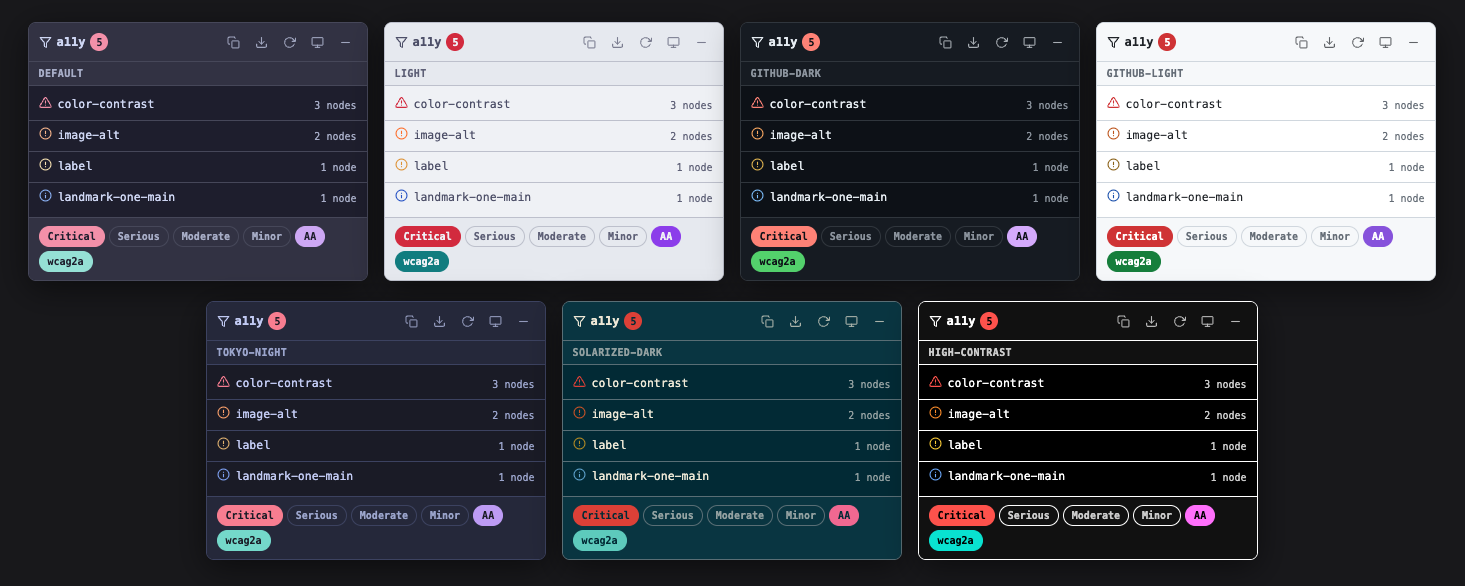
| Theme name | Style | Notes |
|---|---|---|
auto (default) | Follows prefers-color-scheme | Promotes to high-contrast when prefers-contrast: more is detected |
default | Dark (Catppuccin Mocha) | Default fallback when auto resolves to dark |
light | Light (Catppuccin Latte) | Default fallback when auto resolves to light |
high-contrast | Black/white, WCAG AAA | Triggered by OS high-contrast preference |
github-dark | GitHub dark mode | |
github-light | GitHub light mode | |
tokyo-night | Tokyo Night editor theme | |
solarized-dark | Solarized Dark |
Set the theme via mount option, attribute, or runtime API:
// Mount option
mount({ theme: "github-dark" });

// HTML attribute
// <a11y-hud theme="tokyo-night"></a11y-hud>

// Runtime switch
hud.setTheme("solarized-dark");
CSS custom properties
Override any token on the a11y-hud element. Custom properties take precedence over built-in theme values.
a11y-hud {
  --a11y-hud-bg: #0a0a0a;
  --a11y-hud-critical: #ff3333;
}
Color tokens
| Property | Default (dark) | Description |
|---|---|---|
--a11y-hud-bg | #1e1e2e | Panel background |
--a11y-hud-bg-elevated | #313244 | Elevated surfaces (header, filter area) |
--a11y-hud-bg-hover | #45475a | Hover state background |
--a11y-hud-border | #45475a | Border color |
--a11y-hud-text | #cdd6f4 | Primary text color |
--a11y-hud-text-muted | #a6adc8 | Secondary / muted text |
--a11y-hud-critical | #f38ba8 | Critical severity (red family) |
--a11y-hud-serious | #fab387 | Serious severity (orange family) |
--a11y-hud-moderate | #f9e2af | Moderate severity (yellow family) |
--a11y-hud-minor | #89b4fa | Minor severity (blue family) |
--a11y-hud-highlight | #cba6f7 | WCAG-level filter chip active color (purple) |
--a11y-hud-tag | #94e2d5 | Rule-set filter chip active color (teal) |
--a11y-hud-focus-ring | #89b4fa | Keyboard focus ring |
Layout tokens
| Property | Default | Description |
|---|---|---|
--a11y-hud-radius | 8px | Border radius for panel and chips |
--a11y-hud-font | ui-monospace, "Cascadia Code", … | Font family (monospace stack) |
--a11y-hud-z-index | 999999 | z-index for the floating panel |
--a11y-hud-panel-width | 380px | Panel width |
Token semantics
Severity colors
Severity colors carry semantic meaning across all themes. The mapping is intentional and locked:
| Severity | Semantic family | Rationale |
|---|---|---|
critical | Red / danger | Universal danger signal |
serious | Orange / warning | Warning / high priority |
moderate | Yellow / caution | Caution / medium priority |
minor | Blue / info | Informational / low priority |
Themes shift hue and saturation within each family, but the semantic mapping never changes. critical cannot be green.
--a11y-hud-highlight (purple)
Used for WCAG-level filter chip active state (A, AA, AAA, AA Large, AAA Large). Purple is the accent color family.
--a11y-hud-tag (teal)
Used for rule-set filter chip active state (e.g., wcag2a, best-practice). Each theme defines this independently with WCAG AA-verified contrast against --a11y-hud-bg.
Theme architecture rules
These are locked for 1.0 — community themes must follow them:
- Themes are pure CSS, no JS. A theme overrides custom properties in a
[data-theme="name"]block. - Themes change colors only — no layout, typography, or component structure changes.
- Severity colors keep semantic meaning across themes (critical = red family, etc.).
- Theme names are public API. Renaming or removing a theme after 1.0 is a breaking change.
- Custom themes via CSS overrides remain first-class — built-in themes don't deprecate the override path.
Per-theme color values
default (dark, Catppuccin Mocha)
| Property | Value |
|---|---|
--a11y-hud-bg | #1e1e2e |
--a11y-hud-bg-elevated | #313244 |
--a11y-hud-text | #cdd6f4 |
--a11y-hud-critical | #f38ba8 |
--a11y-hud-serious | #fab387 |
--a11y-hud-moderate | #f9e2af |
--a11y-hud-minor | #89b4fa |
--a11y-hud-highlight | #cba6f7 |
--a11y-hud-tag | #94e2d5 |
light (Catppuccin Latte)
| Property | Value |
|---|---|
--a11y-hud-bg | #eff1f5 |
--a11y-hud-bg-elevated | #e6e9ef |
--a11y-hud-text | #4c4f69 |
--a11y-hud-critical | #d20f39 |
--a11y-hud-serious | #fe640b |
--a11y-hud-moderate | #df8e1d |
--a11y-hud-minor | #1452c7 |
--a11y-hud-highlight | #8839ef |
--a11y-hud-tag | #0d7d80 |
github-dark
| Property | Value |
|---|---|
--a11y-hud-bg | #0d1117 |
--a11y-hud-text | #e6edf3 |
--a11y-hud-critical | #ff7b72 |
--a11y-hud-serious | #ffa657 |
--a11y-hud-moderate | #e3b341 |
--a11y-hud-minor | #79c0ff |
--a11y-hud-highlight | #d2a8ff |
--a11y-hud-tag | #56d364 |
github-light
| Property | Value |
|---|---|
--a11y-hud-bg | #ffffff |
--a11y-hud-text | #1f2328 |
--a11y-hud-critical | #cf222e |
--a11y-hud-serious | #bc4c00 |
--a11y-hud-moderate | #8a5e00 |
--a11y-hud-minor | #0550ae |
--a11y-hud-highlight | #8250df |
--a11y-hud-tag | #1a7f37 |
tokyo-night
| Property | Value |
|---|---|
--a11y-hud-bg | #1a1b26 |
--a11y-hud-text | #c0caf5 |
--a11y-hud-critical | #f7768e |
--a11y-hud-serious | #ff9e64 |
--a11y-hud-moderate | #e0af68 |
--a11y-hud-minor | #7aa2f7 |
--a11y-hud-highlight | #bb9af7 |
--a11y-hud-tag | #73daca |
solarized-dark
| Property | Value |
|---|---|
--a11y-hud-bg | #002b36 |
--a11y-hud-text | #eee8d5 |
--a11y-hud-critical | #dc322f |
--a11y-hud-serious | #cb4b16 |
--a11y-hud-moderate | #b58900 |
--a11y-hud-minor | #5ba4cf |
--a11y-hud-highlight | #f06090 |
--a11y-hud-tag | #5cccbc |
high-contrast
| Property | Value |
|---|---|
--a11y-hud-bg | #000000 |
--a11y-hud-text | #ffffff |
--a11y-hud-border | #ffffff |
--a11y-hud-critical | #ff4444 |
--a11y-hud-serious | #ff8800 |
--a11y-hud-moderate | #ffcc00 |
--a11y-hud-minor | #66aaff |
--a11y-hud-highlight | #ff66ff |
--a11y-hud-tag | #00e5d0 |
Custom theme example
To create a custom theme, override properties directly on the element:
/* Custom "dracula" theme */
a11y-hud {
  --a11y-hud-bg: #282a36;
  --a11y-hud-bg-elevated: #44475a;
  --a11y-hud-bg-hover: #6272a4;
  --a11y-hud-border: #6272a4;
  --a11y-hud-text: #f8f8f2;
  --a11y-hud-text-muted: #bd93f9;
  --a11y-hud-critical: #ff5555;
  --a11y-hud-serious: #ffb86c;
  --a11y-hud-moderate: #f1fa8c;
  --a11y-hud-minor: #8be9fd;
  --a11y-hud-highlight: #bd93f9;
  --a11y-hud-tag: #50fa7b;
  --a11y-hud-focus-ring: #bd93f9;
}
See the Custom severity colors cookbook for patterns on overriding individual tokens.