
Ignore-rules workflow
The ignore list lets you mute specific rules or specific element-rule combinations. Ignores are stored in localStorage and survive page reloads. They can be exported as JSON and shared with teammates.
Using the panel UI
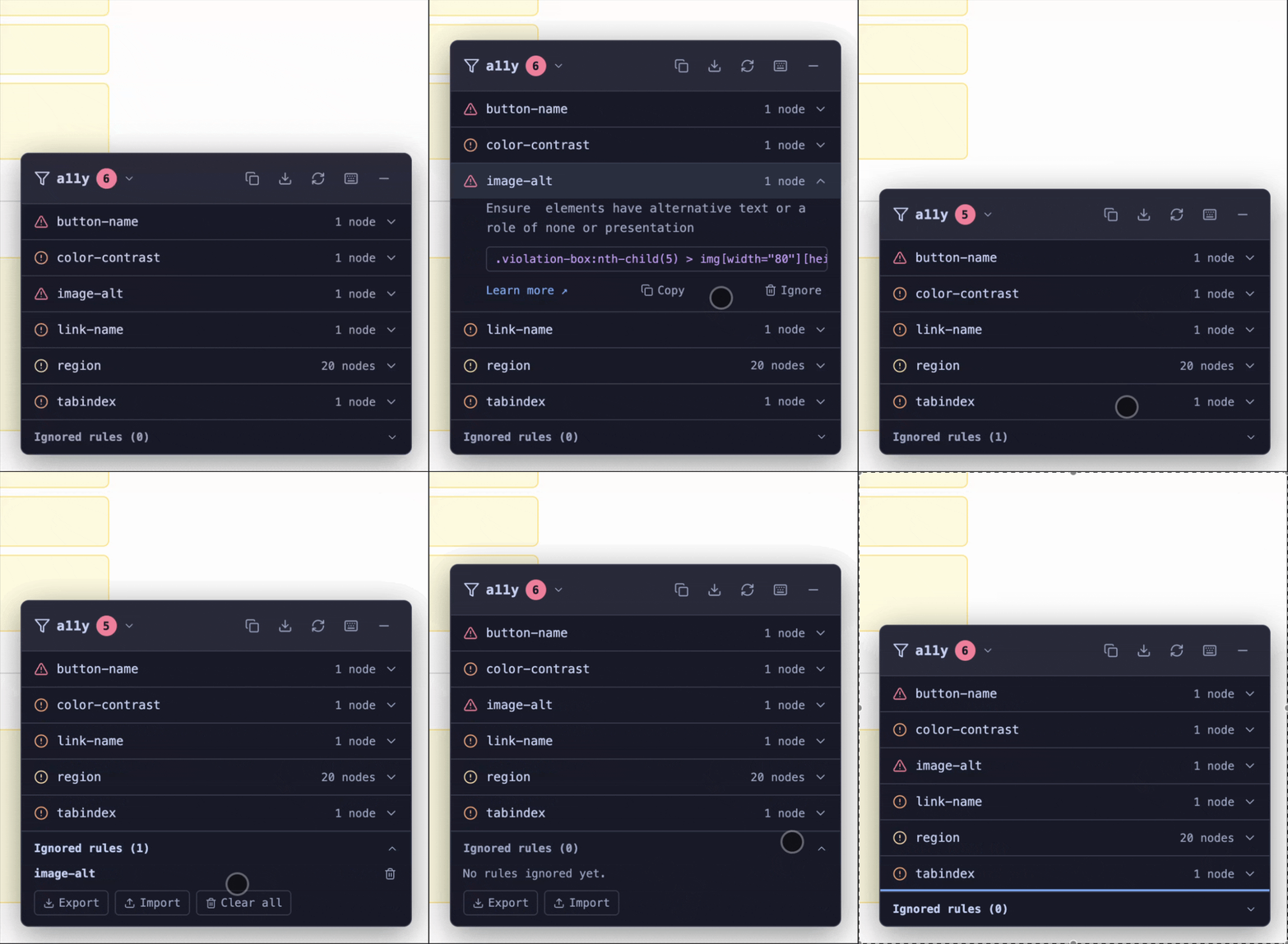
Each violation in the HUD panel has an "Ignore this rule" button in its footer. Clicking it:
- Adds an entry to the ignore list.
- Triggers an immediate rescan.
- The violation disappears from the list.
The "Ignored rules" section is always present at the bottom of the panel, collapsed by default. When there are no ignores it shows "No rules ignored yet." After adding ignores it lists each entry. Click the section header to expand it.
From the Ignored rules section you can:
- Remove an individual ignore (the violation reappears on the next scan).
- Export the full ignore list as a JSON file.
- Import a JSON file to replace the current list.
- Clear all ignores at once.
Headless API
import {
  addIgnore,
  removeIgnore,
  clearIgnores,
  listIgnores,
  exportIgnores,
  importIgnores,
} from "a11y-hud";
Ignore a whole rule
addIgnore("color-contrast");
// All color-contrast violations are suppressed across the whole page
Ignore a rule on a specific element
addIgnore("label", "#legacy-input");
// Only suppresses the label rule for #legacy-input; other label violations remain
The selector must match the selector in the violation's target path (shown in the violation detail in the panel).
List current ignores
const entries = listIgnores();
// [{ ruleId: "color-contrast" }, { ruleId: "label", selector: "#legacy-input" }]
Export and import
// Export as JSON string
const json = exportIgnores();
// '[ {"ruleId":"color-contrast"}, {"ruleId":"label","selector":"#legacy-input"} ]'

// Save to a file (browser)
const blob = new Blob([json], { type: "application/json" });
const url = URL.createObjectURL(blob);
const a = document.createElement("a");
a.href = url;
a.download = "a11y-ignores.json";
a.click();

// Import from a JSON string
importIgnores(json);
Via the instance API
const hud = mount({ theme: "auto" });

hud.ignores.add("color-contrast");
hud.ignores.add("label", "#my-input");
hud.ignores.remove("color-contrast");
hud.ignores.clear();
hud.ignores.list();
hud.ignores.exportJson();
hud.ignores.importJson(json);
Sharing ignore lists across a team
A common pattern for a shared staging environment:
- A QA lead opens the HUD on staging, mutes known false positives using the panel, and exports the ignore list.
- The JSON file is committed to the repo at a known path (e.g.,
a11y-ignores.json). - CI loads the file before running headless scans:
import ignores from "../a11y-ignores.json" with { type: "json" };
import { test, expect } from "@playwright/test";

test("no violations outside the shared ignore list", async ({ page }) => {
  await page.goto("http://localhost:5173");

  const violations = await page.evaluate(async (ignoresJson) => {
    const { importIgnores, runScan } = await import("/node_modules/a11y-hud/dist/index.js");
    importIgnores(ignoresJson);
    const results = await runScan(document.body);
    return results.violations;
  }, JSON.stringify(ignores));

  expect(violations).toHaveLength(0);
});
See the CI integration cookbook for the full Playwright setup.
- Other team members import the same file into their local HUD:
- Open the HUD panel.
- Scroll to "Ignored rules".
- Click "Import" and select
a11y-ignores.json.
localStorage key
The ignore list is stored at localStorage.getItem("a11y-hud:ignores") on the current origin. Ignores are scoped per origin (not per path), so they apply to all pages on the same domain.
What ignores do and don't do
- They are applied to every scan — the panel,
runScan(), and the exported JSON (exportResults()) all reflect the ignore list, because ignored violations are filtered before results are stored. To get an unfiltered export, clear the ignore list first. - They don't carry over to Playwright / headless scans automatically, because those run in a fresh browser context with an empty
localStorage. CallimportIgnores()in the page before scanning.